If you’re diving into machine learning on the cloud, AWS SageMaker is your ultimate game-changer. It simplifies the entire ML lifecycle—from data prep to deployment—so you can build, train, and deploy models faster and smarter than ever before.

What Is AWS SageMaker and Why It Matters

Amazon Web Services (AWS) SageMaker is a fully managed service that empowers developers and data scientists to build, train, and deploy machine learning (ML) models at scale. Unlike traditional ML workflows that require stitching together multiple tools and infrastructure, AWS SageMaker offers an integrated environment that streamlines every step of the process.
Launched in 2017, SageMaker was designed to democratize machine learning by making it accessible to developers without deep expertise in data science. It abstracts away much of the complexity involved in setting up training environments, managing compute resources, and deploying models into production. This means faster time-to-market and reduced operational overhead.
Core Components of AWS SageMaker
SageMaker isn’t just one tool—it’s a comprehensive suite of components working together seamlessly. These include Jupyter notebooks for interactive development, built-in algorithms for common ML tasks, automatic model tuning (hyperparameter optimization), and one-click deployment to scalable endpoints.
- Amazon SageMaker Studio: A web-based IDE for the entire ML lifecycle.
- Amazon SageMaker Notebooks: Managed Jupyter notebook instances.
- Amazon SageMaker Training: Distributed training with managed infrastructure.
- Amazon SageMaker Hosting: Real-time inference endpoints.
- Amazon SageMaker Pipelines: CI/CD for ML workflows.
Each component is designed to work in harmony, reducing friction between experimentation and production. You can start with a notebook, prototype a model, tune its performance, and deploy it—all within the same ecosystem.
How AWS SageMaker Fits Into the Cloud ML Ecosystem
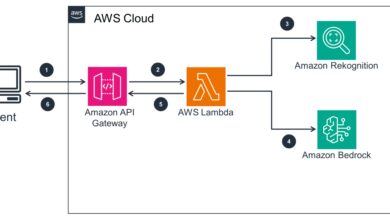
In the broader landscape of cloud-based machine learning platforms, AWS SageMaker competes directly with Google Cloud’s Vertex AI and Microsoft Azure Machine Learning. What sets SageMaker apart is its deep integration with the AWS ecosystem, including services like S3 for storage, IAM for security, CloudWatch for monitoring, and Lambda for serverless computing.
This tight integration allows for seamless data flow and governance. For example, you can pull training data directly from an S3 bucket, apply transformations using SageMaker Processing, train a model using SageMaker Training, and then deploy it behind an API Gateway—all orchestrated within AWS. This reduces dependency on external tools and enhances security and compliance.
“SageMaker has reduced our model deployment time from weeks to hours.” — AWS Customer Testimonial, AWS re:Invent 2022
Key Features That Make AWS SageMaker a Game-Changer
AWS SageMaker stands out not because it does one thing exceptionally well, but because it excels across the entire machine learning workflow. Its feature set is designed to address real-world pain points faced by ML teams, from data scientists to DevOps engineers.
Built-In Algorithms and Pre-Trained Models
SageMaker comes with a library of built-in algorithms optimized for performance and scalability. These include popular methods like XGBoost, Linear Learner, K-Means, Principal Component Analysis (PCA), and DeepAR for time-series forecasting. These algorithms are implemented in a distributed manner, allowing them to handle large datasets efficiently.
Additionally, SageMaker provides access to pre-trained models through Amazon SageMaker Ground Truth and SageMaker JumpStart. JumpStart offers pre-trained models for tasks like image classification, text summarization, and fraud detection, along with solution templates for common use cases.
For instance, if you need a natural language processing (NLP) model, you can deploy a pre-trained BERT model from JumpStart in minutes, fine-tune it on your data, and deploy it without writing extensive code. This accelerates prototyping and reduces the barrier to entry for teams new to ML.
Automatic Model Tuning (Hyperparameter Optimization)
One of the most time-consuming aspects of machine learning is tuning hyperparameters—settings like learning rate, batch size, or tree depth that significantly impact model performance. AWS SageMaker automates this process using Bayesian optimization.
You define the hyperparameters you want to tune and their ranges, and SageMaker runs multiple training jobs in parallel, iteratively refining the search to find the best combination. This not only improves model accuracy but also reduces the manual effort required.
The tuning process is fully customizable. You can specify the objective metric (e.g., validation accuracy), the number of training jobs to run, and even use custom metrics. This flexibility makes it suitable for both simple and complex models.
Real-Time and Batch Inference Options
Once a model is trained, SageMaker supports multiple deployment options. For real-time inference, you can deploy your model as a REST endpoint that responds to requests with low latency. This is ideal for applications like recommendation engines, fraud detection, or chatbots.
For high-throughput, non-time-sensitive workloads, SageMaker offers batch transform. This allows you to apply your model to large datasets stored in S3 without maintaining a persistent endpoint, reducing costs significantly.
You can also enable auto-scaling for real-time endpoints, ensuring your application can handle traffic spikes without manual intervention. This elasticity is a key advantage of cloud-based deployment.
AWS SageMaker Studio: The All-in-One ML Environment
Launched in 2020, Amazon SageMaker Studio is a revolutionary development environment that brings together every tool needed for machine learning into a single, web-based interface. Think of it as the ‘operating system’ for ML on AWS.
Unlike traditional setups where you might use separate tools for coding, debugging, monitoring, and deployment, SageMaker Studio unifies these experiences. From a single tab, you can write code in Jupyter notebooks, monitor training jobs, debug models, and manage endpoints.
Unified Interface for End-to-End ML Workflow
SageMaker Studio provides a visual, drag-and-drop interface for managing ML pipelines. You can see all your experiments, track model versions, compare performance metrics, and even visualize data distributions—all from one dashboard.
The File Browser lets you manage datasets, scripts, and models. The Experiments tab tracks every training run, making it easy to reproduce results or identify the best-performing model. The Debugger and Profiler tools help detect issues like vanishing gradients or CPU bottlenecks during training.
aws sagemaker – Aws sagemaker menjadi aspek penting yang dibahas di sini.
This level of integration reduces context switching and improves collaboration among team members. Data scientists can focus on model development while engineers monitor performance and deployment—all within the same workspace.
Collaboration and Version Control Features
SageMaker Studio supports collaboration through shared projects and Git integration. Teams can work on the same notebook, leave comments, and track changes over time. This is especially useful for enterprises where multiple stakeholders are involved in the ML lifecycle.
Version control is handled via AWS CodeCommit or any Git repository. You can link your SageMaker Studio project to a GitHub repo, enabling CI/CD workflows. This ensures that model code is auditable, reproducible, and aligned with software engineering best practices.
Moreover, SageMaker Studio supports user personas, allowing administrators to assign roles (e.g., data scientist, ML engineer, reviewer) with different permissions. This enhances security and governance, especially in regulated industries like finance or healthcare.
Data Preparation and Processing with AWS SageMaker
Data is the foundation of any machine learning project, and AWS SageMaker provides robust tools for cleaning, transforming, and preparing data at scale. Poor data quality is one of the leading causes of ML project failure, so having reliable preprocessing tools is critical.
SageMaker Data Wrangler for Visual Data Transformation
Amazon SageMaker Data Wrangler is a visual tool that simplifies data preparation. It allows you to import data from various sources (S3, Redshift, Snowflake, etc.), apply transformations (normalization, encoding, imputation), and visualize distributions—all through a point-and-click interface.
You can create data flows that encapsulate preprocessing steps, which can then be exported as Python code or integrated into SageMaker Pipelines. This ensures consistency between training and inference, preventing issues like data drift.
Data Wrangler also includes over 300 built-in transformations and supports custom transformations using Python. For example, you can write a custom function to extract features from text or timestamps and apply it across your dataset.
SageMaker Processing for Scalable Data Jobs
For more complex or large-scale data processing tasks, SageMaker offers SageMaker Processing. This service lets you run distributed data processing jobs using frameworks like Scikit-learn, Spark, or custom containers.
For instance, you might use SageMaker Processing to preprocess terabytes of log data before training a model. The service automatically provisions compute instances, runs your script, and stores the output in S3. You only pay for the compute used, making it cost-effective.
Processing jobs can be integrated into ML pipelines, ensuring that data preparation is automated and repeatable. This is essential for maintaining model accuracy over time as new data becomes available.
Model Training and Optimization in AWS SageMaker
Training machine learning models can be resource-intensive and time-consuming. AWS SageMaker simplifies this by providing managed infrastructure, distributed training capabilities, and optimization tools that reduce both cost and time.
Distributed Training with SageMaker Distributed
SageMaker supports distributed training out of the box, allowing you to train large models faster by splitting the workload across multiple GPUs or instances. This is particularly useful for deep learning models like transformers or computer vision networks.
SageMaker Distributed includes libraries for model parallelism (splitting a model across devices) and data parallelism (splitting data across workers). It integrates with popular frameworks like TensorFlow, PyTorch, and MXNet, so you don’t need to rewrite your code.
For example, you can train a BERT model on a large corpus using SageMaker’s distributed data parallel library, which automatically handles gradient synchronization and communication between nodes. This can reduce training time from days to hours.
Custom Training Containers and Framework Support
While SageMaker provides built-in algorithms, many teams prefer to use custom models written in their framework of choice. SageMaker supports this through custom Docker containers.
You can package your training script and dependencies into a container image, push it to Amazon Elastic Container Registry (ECR), and use it with SageMaker Training. This gives you full control over the environment while still benefiting from SageMaker’s managed infrastructure.
AWS also maintains pre-built containers for popular frameworks, which are regularly updated with the latest versions. These containers are optimized for performance on AWS hardware, including GPU instances.
Cost Management and Spot Instance Integration
Training ML models can be expensive, especially when using high-end GPU instances. To reduce costs, SageMaker integrates with Amazon EC2 Spot Instances, which offer unused compute capacity at up to 90% discount.
You can configure SageMaker Training jobs to use Spot Instances, with automatic checkpointing to save progress in case the instance is reclaimed. This makes it feasible to run large-scale experiments without breaking the budget.
Additionally, SageMaker provides detailed cost tracking through AWS Cost Explorer and CloudWatch metrics. You can monitor spending by project, team, or model, helping you optimize resource allocation.
aws sagemaker – Aws sagemaker menjadi aspek penting yang dibahas di sini.
Deploying and Managing Models with AWS SageMaker
Building a model is only half the battle—deploying it reliably and managing it over time is equally important. AWS SageMaker provides a robust set of tools for model deployment, monitoring, and lifecycle management.
One-Click Model Deployment to Endpoints
SageMaker makes it easy to deploy models with a single API call or click in the console. Once deployed, your model is hosted on a secure, scalable endpoint that can handle thousands of requests per second.
You can choose instance types based on performance and cost requirements. For example, use GPU instances for low-latency inference or CPU instances for cost-sensitive applications. SageMaker also supports multi-model endpoints, where a single endpoint can serve multiple models, reducing overhead.
Deployment can be automated using AWS SDKs or integrated into CI/CD pipelines using SageMaker Pipelines or AWS CodePipeline.
Model Monitoring and Drift Detection
Once a model is in production, its performance can degrade over time due to data drift (changes in input data distribution) or concept drift (changes in the relationship between inputs and outputs). SageMaker addresses this with Model Monitor.
Model Monitor automatically collects data from your inference endpoint, analyzes it for anomalies, and generates alerts when issues are detected. You can define baselines during training and compare real-time data against them.
For example, if your fraud detection model starts receiving transactions with significantly different geolocation patterns, Model Monitor can flag this as a potential data drift, prompting you to retrain the model.
A/B Testing and Canary Deployments
To safely roll out new models, SageMaker supports A/B testing and canary deployments. You can route a small percentage of traffic to a new model version and gradually increase it as confidence grows.
This reduces the risk of deploying a faulty model and allows for real-world performance evaluation. Metrics like latency, error rate, and prediction accuracy can be monitored in real time using CloudWatch.
These capabilities are essential for maintaining high availability and reliability in production ML systems.
Security, Compliance, and Governance in AWS SageMaker
In enterprise environments, security and compliance are non-negotiable. AWS SageMaker is built with security in mind, offering robust controls for data protection, access management, and regulatory compliance.
Identity and Access Management (IAM) Integration
SageMaker integrates tightly with AWS Identity and Access Management (IAM), allowing you to define fine-grained permissions for users and roles. You can control who can create notebooks, train models, or deploy endpoints.
For example, you can create an IAM policy that allows data scientists to run training jobs but prevents them from modifying production endpoints. This principle of least privilege enhances security and reduces the risk of accidental changes.
You can also use IAM roles for service-level access, ensuring that SageMaker services can interact with other AWS resources (like S3 or KMS) without exposing credentials.
Data Encryption and VPC Isolation
All data in SageMaker is encrypted at rest using AWS Key Management Service (KMS). You can use AWS-managed keys or bring your own (BYOK) for greater control.
For network security, SageMaker supports VPC (Virtual Private Cloud) integration. This allows you to isolate your ML workloads from the public internet, ensuring that data stays within your private network.
VPC endpoints can be used to securely access S3 or other services without traversing the public internet, further enhancing data protection.
Audit Logging and Compliance Support
SageMaker integrates with AWS CloudTrail to provide detailed audit logs of all API calls. This is crucial for compliance with standards like GDPR, HIPAA, or SOC 2.
You can track who accessed a notebook, when a model was deployed, or if a training job was modified. These logs can be sent to Amazon CloudWatch Logs or S3 for long-term retention and analysis.
AWS also provides compliance documentation and certifications for SageMaker, making it easier for organizations to meet regulatory requirements.
Use Cases and Real-World Applications of AWS SageMaker
AWS SageMaker is not just a theoretical platform—it’s being used by companies across industries to solve real business problems. From healthcare to finance, retail to manufacturing, SageMaker enables innovation at scale.
aws sagemaker – Aws sagemaker menjadi aspek penting yang dibahas di sini.
Fraud Detection in Financial Services
Banks and fintech companies use SageMaker to build real-time fraud detection systems. By training models on historical transaction data, they can identify suspicious patterns and flag potentially fraudulent activities.
For example, a credit card company might use SageMaker to train an anomaly detection model that scores each transaction. High-risk transactions are blocked or sent for manual review, reducing losses and improving customer trust.
SageMaker’s real-time inference capabilities ensure low-latency decision-making, which is critical in financial applications.
Personalized Recommendations in E-Commerce
Retailers leverage SageMaker to power personalized recommendation engines. By analyzing customer behavior, purchase history, and browsing patterns, they can suggest products that increase conversion rates and average order value.
One global e-commerce platform reported a 30% increase in click-through rates after deploying a SageMaker-powered recommendation system. The ability to retrain models daily ensures recommendations stay relevant.
SageMaker’s batch inference is used to generate recommendations for millions of users overnight, while real-time endpoints handle dynamic suggestions during live sessions.
Predictive Maintenance in Manufacturing
Manufacturers use SageMaker to predict equipment failures before they occur. By analyzing sensor data from machines, they can detect early signs of wear and schedule maintenance proactively.
This reduces downtime, extends equipment life, and lowers maintenance costs. One automotive manufacturer reduced unplanned downtime by 45% using a SageMaker-based predictive maintenance model.
The model is trained on historical sensor data and deployed at the edge using SageMaker Edge Manager, allowing inference to happen locally on factory devices.
What is AWS SageMaker used for?
AWS SageMaker is used to build, train, and deploy machine learning models at scale. It supports the entire ML lifecycle, from data preparation to model monitoring, and is widely used for applications like fraud detection, recommendation engines, and predictive maintenance.
Is AWS SageMaker free to use?
AWS SageMaker is not free, but it offers a free tier with limited usage. You pay for the resources you consume, such as notebook instances, training jobs, and deployed endpoints. Costs vary based on instance type, duration, and data volume.
How does SageMaker compare to Google Vertex AI?
Both SageMaker and Vertex AI offer end-to-end ML platforms. SageMaker has deeper integration with the AWS ecosystem and more mature tooling for enterprise use, while Vertex AI offers tighter integration with Google’s AI models and BigQuery. The choice depends on your cloud provider preference and existing infrastructure.
Can I use my own ML models in SageMaker?
Yes, you can use custom models in SageMaker by packaging them in Docker containers. SageMaker supports popular frameworks like TensorFlow, PyTorch, and Scikit-learn, allowing you to bring your own algorithms and code.
Does SageMaker support automatic model retraining?
Yes, SageMaker supports automated retraining through SageMaker Pipelines and EventBridge. You can set up workflows that trigger retraining when new data arrives or model performance degrades, ensuring your models stay up to date.
In conclusion, AWS SageMaker is a powerful, comprehensive platform that transforms how organizations develop and deploy machine learning models. From its intuitive Studio interface to its robust security and scalability, SageMaker addresses the full spectrum of ML challenges. Whether you’re a startup experimenting with AI or an enterprise running mission-critical models, SageMaker provides the tools and infrastructure to succeed. By automating complex tasks and integrating seamlessly with the AWS ecosystem, it enables faster innovation and more reliable deployments. As machine learning continues to evolve, AWS SageMaker remains at the forefront, empowering teams to turn data into actionable intelligence.
aws sagemaker – Aws sagemaker menjadi aspek penting yang dibahas di sini.
Recommended for you 👇
Further Reading: