Managing databases in the cloud doesn’t have to be complicated. With AWS RDS, Amazon simplifies database deployment, scaling, and maintenance so you can focus on building applications, not infrastructure.

What Is AWS RDS and Why It Matters

Amazon Web Services (AWS) Relational Database Service (RDS) is a managed service that makes it easy to set up, operate, and scale relational databases in the cloud. It supports multiple database engines, including MySQL, PostgreSQL, Oracle, SQL Server, MariaDB, and Amazon Aurora. Instead of manually installing and maintaining database servers, AWS RDS automates time-consuming administrative tasks such as hardware provisioning, database setup, patching, backups, and recovery.
Core Definition and Purpose
AWS RDS is not a database itself but a service layer that manages relational databases on your behalf. It abstracts the complexity of database administration, allowing developers and IT teams to deploy high-performance databases with minimal effort. Whether you’re running a small web application or a large enterprise system, AWS RDS provides a reliable, scalable, and secure database environment.
- Supports six major database engines
- Automates backups, patching, and failover
- Enables quick scaling of compute and storage
How AWS RDS Fits Into the Cloud Ecosystem
In the broader AWS ecosystem, RDS integrates seamlessly with services like Amazon EC2, Amazon S3, AWS Identity and Access Management (IAM), Amazon CloudWatch, and AWS CloudTrail. This integration allows for enhanced monitoring, logging, access control, and data backup strategies. For example, you can use CloudWatch to monitor CPU usage and set alarms, or use S3 to store automated database snapshots.
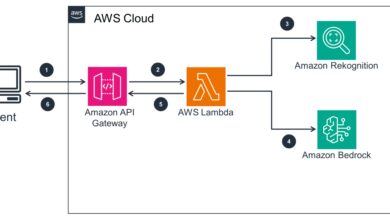
Moreover, AWS RDS works well with serverless architectures. When paired with AWS Lambda, it enables event-driven applications where database changes can trigger functions—ideal for real-time data processing.
“AWS RDS removes the undifferentiated heavy lifting of database management, letting organizations innovate faster.” — AWS Official Documentation
Key Features That Make AWS RDS Powerful
AWS RDS stands out due to its robust feature set designed to enhance performance, availability, and ease of use. These features are critical for businesses aiming for high uptime, data durability, and operational efficiency.
Automated Backups and Point-in-Time Recovery
One of the most valuable features of AWS RDS is its automated backup system. You can enable daily backups with retention periods ranging from 1 to 35 days. These backups are stored in Amazon S3 and encrypted by default if you enable encryption at rest.
Point-in-time recovery allows you to restore your database to any second within the retention window—down to the second. This is crucial for recovering from accidental data deletion or application bugs without relying solely on daily snapshots.
- Daily automated snapshots
- Point-in-time recovery up to the second
- Backups stored in durable S3 storage
Multi-AZ Deployments for High Availability
AWS RDS supports Multi-AZ (Availability Zone) deployments, which provide enhanced availability and durability for production workloads. In a Multi-AZ setup, AWS automatically provisions and maintains a synchronous standby replica in a different Availability Zone (AZ).
If the primary database instance fails, AWS RDS automatically fails over to the standby, minimizing downtime. This failover is transparent to most applications, especially when using DNS redirection and connection pooling.
Multi-AZ is ideal for mission-critical applications where downtime can result in significant financial or reputational loss. While it increases costs slightly, the trade-off in reliability is often worth it.
Read Replicas for Scalability
To handle read-heavy workloads, AWS RDS allows you to create up to five read replicas. These replicas asynchronously replicate data from the primary (master) instance and can be located in the same or different regions.
Read replicas help distribute the read load, improving performance and reducing latency for users in different geographic locations. They are commonly used in analytics dashboards, reporting tools, and content delivery networks.
You can also promote a read replica to become a standalone database, which is useful during region expansion or disaster recovery scenarios. Learn more about read replicas in the AWS RDS Read Replicas documentation.
Supported Database Engines in AWS RDS
AWS RDS supports a wide range of relational database engines, giving you flexibility to choose the right tool for your application’s needs. Each engine has its own licensing model, performance characteristics, and use cases.
Amazon Aurora: The High-Performance Choice
Amazon Aurora is AWS’s proprietary database engine, compatible with MySQL and PostgreSQL. It offers up to five times the throughput of standard MySQL and three times that of PostgreSQL, with enhanced reliability and scalability.
Aurora automatically replicates data across six storage nodes in three Availability Zones, providing fault tolerance and continuous availability. It also features auto-scaling storage, which grows as your data grows—up to 128 TB per instance.
Aurora Serverless is a variant that automatically scales capacity based on demand, making it ideal for unpredictable workloads. It’s perfect for development, testing, or applications with variable traffic patterns.
MySQL and PostgreSQL: Open-Source Favorites
MySQL and PostgreSQL are two of the most popular open-source databases, and AWS RDS makes them easy to deploy and manage. MySQL is known for its speed and simplicity, widely used in web applications. PostgreSQL excels in complex queries, JSON support, and extensibility, making it a favorite for data-heavy applications.
Both engines benefit from AWS RDS’s automation features, including automated backups, patching, and monitoring. They are also eligible for read replicas and Multi-AZ deployments.
For developers, using RDS with PostgreSQL means access to advanced features like full-text search, geospatial data types, and support for multiple procedural languages. More details can be found in the AWS RDS for PostgreSQL page.
Oracle and SQL Server: Enterprise Powerhouses
For enterprises already invested in Oracle or Microsoft SQL Server, AWS RDS provides a managed path to the cloud. You can migrate your existing licenses using the License Included model or bring your own license (BYOL).
Oracle on RDS supports advanced features like Transparent Data Encryption (TDE), Real Application Clusters (RAC), and automated backups. SQL Server on RDS supports various editions (Standard, Web, Enterprise, and Express) and integrates well with .NET applications and Microsoft BI tools.
However, these engines come with higher costs due to licensing. It’s important to evaluate cost versus benefit when choosing between open-source and enterprise databases on AWS RDS.
Setting Up Your First AWS RDS Instance
Creating an AWS RDS instance is straightforward, whether you use the AWS Management Console, AWS CLI, or Infrastructure as Code (IaC) tools like AWS CloudFormation or Terraform.
Step-by-Step Guide via AWS Console
To launch your first RDS instance:
Log in to the AWS Management Console and navigate to the RDS dashboard.Click “Create database” and choose a database engine (e.g., MySQL, PostgreSQL).Select a template (e.g., Dev/Test or Production) based on your use case.Configure settings like DB instance identifier, master username, and password.Choose instance class (e.g., db.t3.micro for free tier).Set storage type and size (General Purpose SSD is recommended for most use cases)..
Enable or disable Multi-AZ deployment based on availability needs.Configure connectivity: VPC, subnet group, security group, and public accessibility.Enable automated backups and set retention period.Review and create the instance.Once created, AWS RDS provisions the instance, which may take 10–15 minutes.After launch, you can connect using standard database tools like MySQL Workbench or pgAdmin..
Security Best Practices During Setup
Security should be a top priority when setting up AWS RDS. Here are key best practices:
- Never expose your database to the public internet unless absolutely necessary.
- Use VPCs and security groups to restrict access to specific IP ranges or EC2 instances.
- Enable encryption at rest using AWS Key Management Service (KMS).
- Enable encryption in transit using SSL/TLS for database connections.
- Use IAM roles and policies to manage access to RDS resources.
- Rotate master passwords regularly and use AWS Secrets Manager to store credentials securely.
For example, you can create a security group that only allows inbound traffic on port 3306 (MySQL) from your application server’s security group. This principle of least privilege minimizes attack surface.
Using Infrastructure as Code (IaC)
For reproducible and scalable deployments, consider using IaC tools. With Terraform, you can define an RDS instance in code:
resource "aws_db_instance" "mydb" {
  allocated_storage    = 20
  engine               = "mysql"
  engine_version       = "8.0"
  instance_class       = "db.t3.micro"
  name                 = "mydb"
  username             = "admin"
  password             = "securepassword"
  parameter_group_name = "default.mysql8.0"
  skip_final_snapshot  = true
}
This approach ensures consistency across environments (dev, staging, prod) and enables version control, collaboration, and automated testing.
Performance Optimization and Monitoring in AWS RDS
Even the best-managed databases can suffer from performance issues if not monitored and tuned properly. AWS RDS provides several tools and strategies to keep your databases running smoothly.
Leveraging Enhanced Monitoring and CloudWatch
AWS CloudWatch is the primary monitoring service for RDS. It collects metrics such as CPU utilization, memory usage, disk I/O, and database connections. You can set alarms to notify you when thresholds are exceeded.
Enhanced Monitoring, when enabled, provides OS-level metrics like file system usage, swap memory, and process counts. This deeper visibility helps diagnose performance bottlenecks that aren’t visible at the database level.
For example, if your CPU usage spikes to 90%, CloudWatch can trigger an SNS notification or even auto-scale your instance using AWS Lambda.
Using Performance Insights for Deep Analysis
Performance Insights is a powerful tool included with AWS RDS (at no extra cost for most engines). It provides a visual dashboard of database load, broken down by SQL queries, wait events, and users.
You can identify the top SQL statements consuming the most resources and optimize them. For instance, a poorly written query without proper indexing might be using 70% of your database load. Performance Insights helps you pinpoint such issues quickly.
It also supports filtering by time range, SQL ID, and wait types (e.g., IO, lock, CPU), making it easier to troubleshoot performance degradation.
Scaling Strategies: Vertical vs. Horizontal
AWS RDS supports both vertical and horizontal scaling:
- Vertical Scaling: Upgrade your instance class (e.g., from db.t3.micro to db.m5.large) to increase CPU, memory, and network capacity. This requires a reboot but is simple to implement.
- Horizontal Scaling: Use read replicas to distribute read traffic. This is ideal for applications with heavy read-to-write ratios.
For Aurora, you can also use Aurora Auto Scaling to automatically add or remove read replicas based on CPU utilization. This ensures optimal performance without over-provisioning.
Cost Management and Pricing Models for AWS RDS
Understanding AWS RDS pricing is essential to avoid unexpected bills. Costs depend on instance type, storage, I/O operations, backup retention, and data transfer.
Breakdown of RDS Pricing Components
The main cost components are:
- Instance Hours: Billed per second (after the first minute) for the DB instance running time.
- Storage: Includes provisioned storage (GB/month) and I/O operations (for Provisioned IOPS).
- Backup Storage: First 100% of your primary storage is free; beyond that, you pay for snapshot storage.
- Data Transfer: Costs apply for data transferred out of AWS (e.g., to the internet).
- Licensing: Oracle and SQL Server have higher costs due to licensing models.
For example, a db.t3.micro instance running MySQL costs around $0.017 per hour, totaling ~$12.50/month if running 24/7. Compare pricing across engines using the AWS RDS Pricing Calculator.
Reserved Instances and Savings Plans
To reduce costs, consider Reserved Instances (RIs) or Savings Plans. By committing to a 1- or 3-year term, you can save up to 75% compared to On-Demand pricing.
RIs are ideal for production databases with steady workloads. Savings Plans offer more flexibility and can apply across multiple AWS services, including RDS.
For non-critical environments like development or staging, use On-Demand instances and shut them down when not in use to save costs.
Cost Optimization Best Practices
To keep RDS costs under control:
- Use the AWS Free Tier for learning and small projects (750 hours/month of db.t2.micro or db.t3.micro).
- Delete unused instances and snapshots regularly.
- Right-size your instance based on actual usage (use CloudWatch metrics).
- Use General Purpose SSD unless you need high IOPS.
- Monitor backup storage and delete old snapshots.
Security, Compliance, and Data Protection in AWS RDS
Security is paramount when dealing with databases, especially those containing sensitive or regulated data. AWS RDS provides multiple layers of protection to ensure data confidentiality, integrity, and availability.
Encryption: At Rest and in Transit
AWS RDS supports encryption at rest using AWS KMS. When enabled, the database instance, automated backups, snapshots, and read replicas are all encrypted. This is essential for compliance with standards like HIPAA, GDPR, and PCI-DSS.
For data in transit, use SSL/TLS to encrypt connections between your application and the database. AWS provides SSL certificates, and you can enforce SSL connections via database parameters.
Example: In PostgreSQL, you can set ssl = on in the parameter group to require encrypted connections.
Network Isolation and VPC Integration
RDS instances should be deployed within a Virtual Private Cloud (VPC) to isolate them from the public internet. Use private subnets for database instances and public subnets for application servers.
Security groups act as virtual firewalls, controlling inbound and outbound traffic. For example, only allow port 5432 (PostgreSQL) from your application server’s security group.
You can also use VPC endpoints to access RDS without going through the public internet, enhancing security and reducing latency.
Audit and Compliance with CloudTrail and IAM
AWS CloudTrail logs all API calls made to RDS, such as instance creation, deletion, or configuration changes. This audit trail is crucial for security investigations and compliance reporting.
Use AWS IAM to define fine-grained access policies. For example, you can create a policy that allows a developer to modify DB parameters but not delete the instance.
For regulated industries, AWS provides compliance programs and documentation. Visit the AWS Compliance Center for details on certifications like SOC, ISO, and FedRAMP.
Migrating to AWS RDS: Strategies and Tools
Migrating existing databases to AWS RDS can be challenging, but AWS provides tools to simplify the process.
Using AWS Database Migration Service (DMS)
AWS DMS allows you to migrate databases with minimal downtime. It supports homogeneous (e.g., Oracle to Oracle) and heterogeneous (e.g., Oracle to PostgreSQL) migrations.
You can perform one-time migrations or ongoing replication. DMS captures changes from the source database and applies them to the target RDS instance, ensuring data consistency.
For large databases, use the AWS Schema Conversion Tool (SCT) to convert schema and code objects when moving between different database engines.
Best Practices for Zero-Downtime Migration
To achieve zero-downtime migration:
- Test the migration process in a staging environment first.
- Use DMS with ongoing replication to keep the target in sync.
- Switch DNS or application configuration during a maintenance window.
- Validate data consistency post-migration.
- Monitor performance and fix any bottlenecks.
Plan the migration during low-traffic periods and communicate with stakeholders to minimize business impact.
Common Migration Challenges and Solutions
Common issues include:
- Schema Incompatibility: Use AWS SCT to convert syntax and data types.
- Large Data Volumes: Use compression and high-bandwidth connections.
- Network Latency: Deploy DMS replication instance in the same region as the target RDS.
- Application Downtime: Use read replicas or dual-write strategies during cutover.
With proper planning, most migrations can be completed smoothly and efficiently.
Advanced AWS RDS Features and Use Cases
Beyond basic database management, AWS RDS offers advanced features for specialized use cases.
Aurora Global Database for Low-Latency Global Applications
Aurora Global Database allows you to deploy a single database cluster across multiple AWS regions. It provides fast, low-latency read access in different geographic locations and can recover from a regional outage in less than a minute.
This is ideal for global applications like e-commerce platforms or financial services that require high availability and low latency for users worldwide.
RDS Proxy for Connection Management
RDS Proxy sits between your application and database, managing database connections efficiently. It reduces the overhead of creating and tearing down connections, which is especially beneficial for serverless applications using AWS Lambda.
With RDS Proxy, you can handle thousands of concurrent connections without exhausting database connection limits. It also improves application availability during failovers by automatically redirecting connections to the new primary instance.
Integration with DevOps and CI/CD Pipelines
AWS RDS can be integrated into DevOps workflows using tools like AWS CodePipeline, CodeBuild, and CloudFormation. For example, you can automate database schema updates using migration scripts (e.g., Flyway or Liquibase) triggered during deployment.
However, exercise caution: never run destructive operations (e.g., DROP TABLE) automatically. Always use staging environments for testing database changes.
What is AWS RDS?
AWS RDS (Relational Database Service) is a managed database service by Amazon Web Services that simplifies setting up, operating, and scaling relational databases in the cloud. It supports engines like MySQL, PostgreSQL, Oracle, SQL Server, and Amazon Aurora.
How much does AWS RDS cost?
Costs vary based on instance type, storage, backup retention, and data transfer. A db.t3.micro instance starts at ~$0.017/hour. Use the AWS Pricing Calculator for accurate estimates.
Is AWS RDS secure?
Yes. AWS RDS provides encryption at rest and in transit, network isolation via VPC, IAM access control, and audit logging with CloudTrail, making it secure for production workloads.
Can I migrate my existing database to AWS RDS?
Yes. Use AWS Database Migration Service (DMS) and Schema Conversion Tool (SCT) to migrate with minimal downtime, supporting both homogeneous and heterogeneous database migrations.
What is the difference between RDS and Aurora?
Aurora is a high-performance, MySQL- and PostgreSQL-compatible database engine offered by AWS. It’s part of RDS but provides better performance, scalability, and availability compared to standard RDS engines.
In conclusion, AWS RDS is a powerful, flexible, and secure solution for managing relational databases in the cloud. From automated backups and high availability to global scalability and cost efficiency, it addresses the core challenges of modern database management. Whether you’re a startup or an enterprise, leveraging AWS RDS can significantly reduce operational overhead and accelerate your development lifecycle. By understanding its features, best practices, and integration options, you can build resilient, high-performance applications that scale with your business needs.
Recommended for you 👇
Further Reading: