Building web and mobile apps has never been easier—thanks to AWS Amplify. This game-changing platform simplifies development, backend setup, and deployment, letting you focus on what matters: creating amazing user experiences.




What Is AWS Amplify and Why It Matters

AWS Amplify is a suite of tools and services from Amazon Web Services designed to help developers build scalable full-stack applications quickly. Whether you’re working on a React frontend or a Flutter mobile app, Amplify provides the backend infrastructure and deployment pipeline with minimal configuration.
Core Components of AWS Amplify
AWS Amplify isn’t just one tool—it’s a collection of integrated services that work together seamlessly. The three main components are the Amplify CLI, Amplify Console, and Amplify Libraries.
- Amplify CLI: A command-line interface that helps you set up and manage backend services like authentication, APIs, and storage.
- Amplify Console: A continuous deployment and hosting service for web apps with built-in CI/CD pipelines.
- Amplify Libraries: Client-side libraries that connect your frontend to AWS services with minimal code.
These components allow developers to go from idea to production in record time. For example, setting up user authentication with Amazon Cognito used to require complex configurations, but Amplify automates most of it.
How AWS Amplify Fits Into Modern Development
In today’s fast-paced tech environment, speed and scalability are critical. AWS Amplify bridges the gap between frontend developers and cloud infrastructure, reducing dependency on DevOps teams.
It supports popular frameworks like React, Angular, Vue, Next.js, and mobile platforms such as iOS, Android, and Flutter. This flexibility makes it ideal for startups and enterprises alike.
According to AWS’s official documentation, Amplify is built for developers who want to ship features faster without getting bogged down by backend complexity.
“AWS Amplify makes it easy to add cloud-powered features like authentication, storage, and APIs to your app.” — Amazon Web Services
Setting Up Your First Project with AWS Amplify
Getting started with AWS Amplify is straightforward. You don’t need deep AWS expertise to begin building. Here’s how to create your first project step by step.
Prerequisites and Installation
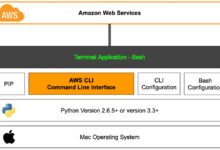
Before diving in, ensure you have Node.js and npm installed. Then, install the Amplify CLI globally using npm:
- Run
npm install -g @aws-amplify/cli - Configure your AWS credentials using
amplify configure - Log in to your AWS account via the CLI
This process sets up an IAM user with the necessary permissions. You can find detailed instructions on the Amplify CLI installation guide.
Initializing a New Amplify Project
Once the CLI is installed, navigate to your frontend project directory (e.g., a React app) and run:
amplify init- Choose your project name, environment (e.g., dev, prod), and default editor
- Select your app type (JavaScript, iOS, Android, etc.)
The CLI creates a new environment in your AWS account and initializes the necessary configuration files. From here, you can start adding features like authentication or APIs.
Adding Authentication with AWS Amplify
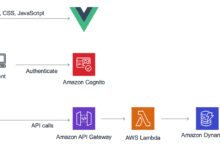
User authentication is one of the most common—and complex—features in modern apps. AWS Amplify simplifies this by integrating with Amazon Cognito behind the scenes.
Setting Up User Sign-Up and Sign-In
To enable authentication, run:
amplify add auth- Choose default configuration or customize settings
- Enable social logins (Google, Facebook, Apple) if needed
Amplify generates the required Cognito User Pool and Identity Pool automatically. You can then use the Amplify UI components to add login forms to your app with just a few lines of code.
For React, import the withAuthenticator higher-order component:
import { withAuthenticator } from '@aws-amplify/ui-react';
function App() {
  return Hello World;
}
export default withAuthenticator(App);
This instantly adds a fully functional authentication flow.
Customizing Authentication Flows
While the default setup works for most cases, you might need to customize the authentication experience. Amplify allows you to:
- Add custom email/SMS templates
- Enable MFA (Multi-Factor Authentication)
- Set password policies and account recovery options
You can also trigger Lambda functions during authentication events (like post-confirmation) to run custom logic, such as sending welcome emails or syncing user data.
Learn more about advanced auth patterns in the Amplify Authentication Guide.
Building APIs with GraphQL and REST Using AWS Amplify
One of Amplify’s strongest features is its ability to generate and manage APIs quickly. Whether you prefer GraphQL or REST, Amplify has you covered.
Creating a GraphQL API with AWS AppSync
GraphQL is ideal for apps that need flexible data queries. Amplify uses AWS AppSync as the managed GraphQL service.
To create a GraphQL API:
- Run
amplify add api - Select GraphQL
- Choose a schema template (e.g., todo app) or create a custom one
- Enable authorization modes (API key, IAM, Cognito User Pools)
Amplify generates the schema, sets up AppSync, and provisions a DynamoDB table for each type. It also generates TypeScript/JavaScript types and query/mutation/subscription functions.
For example, a simple Todo type:
type Todo @model {
  id: ID!
  name: String!
  description: String
  completed: Boolean
}
The @model directive tells Amplify to create a DynamoDB table and CRUD operations automatically.
Working with REST APIs and Lambda Functions
If you prefer REST, Amplify supports creating REST endpoints backed by AWS Lambda.
Steps:
- Run
amplify add api - Select REST
- Choose an existing Lambda function or create a new one
- Define CRUD operations and paths (e.g., /items)
Amplify configures API Gateway and links it to your Lambda function. You can then call the endpoint from your frontend using the Amplify API module:
import { API } from 'aws-amplify';
API.get('myapi', '/items');
This integration streamlines backend development, especially for microservices or serverless architectures.
Managing Data Storage with AWS Amplify
Storing and retrieving data is a core requirement for nearly every app. AWS Amplify provides multiple storage options depending on your needs.
Using Amazon S3 for File Storage
For storing images, videos, or documents, Amplify integrates seamlessly with Amazon S3.
To add storage:
- Run
amplify add storage - Select Content (for files)
- Configure access permissions (public, protected, private)
Once set up, use the Storage module in your app:
import { Storage } from 'aws-amplify';

// Upload a file
await Storage.put('test.txt', 'Hello World');

// Get a file
const url = await Storage.get('test.txt');
Files are stored securely in S3, and Amplify handles signed URLs and access control automatically.
Offline Data Sync with DataStore
AWS Amplify DataStore is a powerful feature that enables offline-first applications. It synchronizes data between your app and the cloud automatically.
DataStore uses the same GraphQL schema defined in your API. When the device is online, changes sync to AppSync and DynamoDB. When offline, mutations are queued and synced later.
Example usage:
import { DataStore } from 'aws-amplify';
import { Todo } from '../models';

// Save a todo offline
await DataStore.save(new Todo({ name: 'Buy groceries' }));

// Query todos (returns local data if offline)
const todos = await DataStore.query(Todo);
This is perfect for mobile apps where connectivity is unreliable.
Deploying and Hosting Apps with Amplify Console
Once your app is built, deploying it should be just as easy as developing it. AWS Amplify Console makes deployment a breeze.
Connecting Your Git Repository
Amplify Console integrates directly with GitHub, Bitbucket, GitLab, and AWS CodeCommit.
To deploy:
- Push your code to a Git repository
- Connect the repo to Amplify Console
- Set build settings (e.g., build command:
npm run build) - Deploy with a single click
Amplify automatically detects your framework and suggests a build configuration. It then provisions a unique URL for your app (e.g., dev.yourapp.amplifyapp.com).
Managing Environments and CI/CD
Amplify supports multi-environment workflows with branching strategies.
- Each Git branch (e.g., dev, staging, main) can map to a separate Amplify environment
- Automatic builds trigger on every push
- Custom domains and SSL certificates can be added
This enables true CI/CD pipelines without needing Jenkins or GitHub Actions. You can also roll back to previous versions instantly.
For more details, check the Amplify Console User Guide.
Advanced Features and Best Practices
While Amplify is beginner-friendly, it also supports advanced use cases for experienced developers.
Customizing Amplify Behind the Scenes
Under the hood, Amplify uses CloudFormation templates to provision AWS resources. You can customize these templates to add features not available through the CLI.
For example, you might want to add a custom domain to your S3 bucket or configure advanced Cognito triggers. Simply edit the CloudFormation files in the amplify/backend directory.
However, be cautious: manual changes can conflict with future amplify push commands. Always back up your changes.
Monitoring and Debugging with Amplify
Amplify integrates with AWS CloudWatch and AWS X-Ray for monitoring and debugging.
- View logs from Lambda functions and AppSync resolvers
- Track API latency and error rates
- Set up alarms for critical issues
You can also use the amplify console command to open the Amplify Console directly from your terminal for quick access to logs and metrics.
Real-World Use Cases of AWS Amplify
Many companies use AWS Amplify to accelerate their development cycles. Let’s look at some real-world applications.
Startup MVP Development
Startups often need to validate ideas quickly. Amplify allows them to build a full-stack app in days, not weeks.
For example, a health-tracking app can use Amplify for:
- User authentication via Cognito
- Storing workout data in AppSync/DynamoDB
- Uploading progress photos to S3
- Deploying via Amplify Console
This reduces time-to-market and infrastructure costs significantly.
Enterprise Internal Tools
Large organizations use Amplify to build internal dashboards, HR portals, and reporting tools.
Benefits include:
- Fast iteration without involving central IT
- Secure authentication with SSO integration
- Scalable backend that grows with usage
Teams can own their apps end-to-end, from code to deployment.
What is AWS Amplify used for?
AWS Amplify is used to build, deploy, and host full-stack web and mobile applications. It simplifies backend setup for authentication, APIs, storage, and serverless functions, allowing developers to focus on frontend logic and user experience.
Is AWS Amplify free to use?
AWS Amplify has a generous free tier that includes 1,000 build minutes, 5,000 serverless function invocations, and 15 GB of data transfer per month. Beyond that, you pay only for what you use, based on AWS pricing for underlying services like Lambda, S3, and AppSync.
How does Amplify compare to Firebase?
Both Amplify and Firebase offer backend-as-a-service features, but Amplify integrates deeply with the broader AWS ecosystem. This makes it better suited for complex, scalable applications that may need services like ECS, RDS, or SageMaker later. Firebase is simpler for basic apps but can become limiting at scale.
Can I use AWS Amplify with React Native?
Yes, AWS Amplify fully supports React Native. It provides libraries and UI components tailored for mobile development, including offline data sync with DataStore, push notifications, and camera integration.
Does AWS Amplify support custom domains?
Yes, Amplify Console allows you to connect custom domains with free SSL certificates via Amazon Certificate Manager. You can configure domain aliases and redirect rules directly in the console.
AWS Amplify is more than just a deployment tool—it’s a complete development framework that empowers developers to build scalable, secure, and high-performance applications with minimal effort. From authentication to APIs, storage to CI/CD, Amplify handles the heavy lifting so you can focus on innovation. Whether you’re a solo developer or part of a large team, Amplify accelerates your workflow and reduces time-to-market. As cloud development evolves, tools like AWS Amplify are becoming essential for staying competitive in the digital landscape.
Recommended for you 👇
Further Reading: